How to do Paper Trading in Upstox? – A Complete Guide for Beginners (2026)

With platforms like Upstox and Sensibull, it becomes easy to practice trading in segments such as Nifty and Bank Nifty options, stock futures and options, currency derivatives like USDINR, and commodities including gold, silver, and crude oil.

Paper trading is one of the best ways to learn trading without risking real money. It allows traders to test strategies in real market conditions and understand how trades behave before using actual capital.

With platforms like Upstox, it is possible to forward test strategies across multiple segments including Nifty, Bank Nifty, and stock futures and options.

How to do Paper Trading in Upstox? – Step-by-Step Tutorial


Can You Do Paper Trading on Upstox on your Computer?

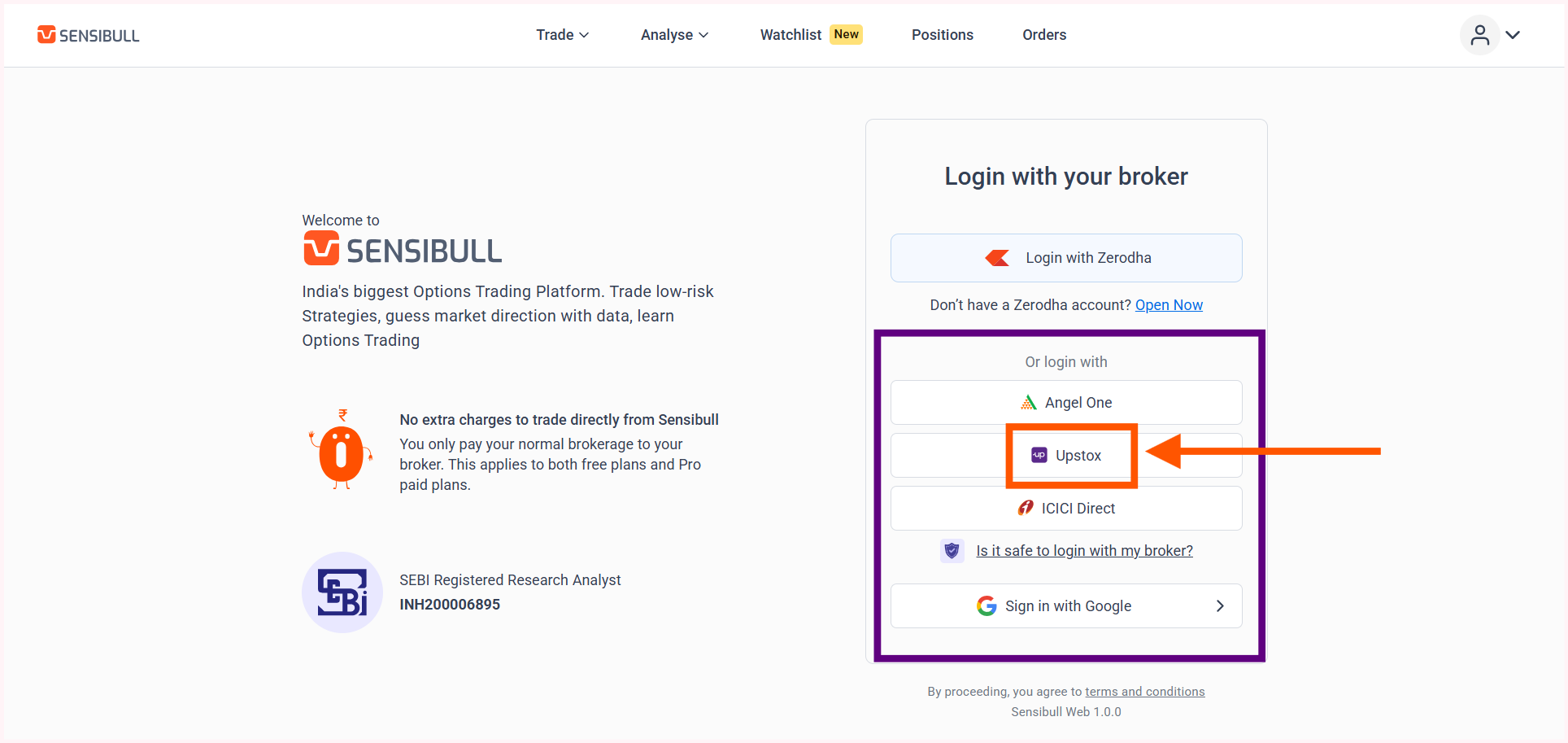
Open the Sensibull website and proceed to login using Upstox credentials.
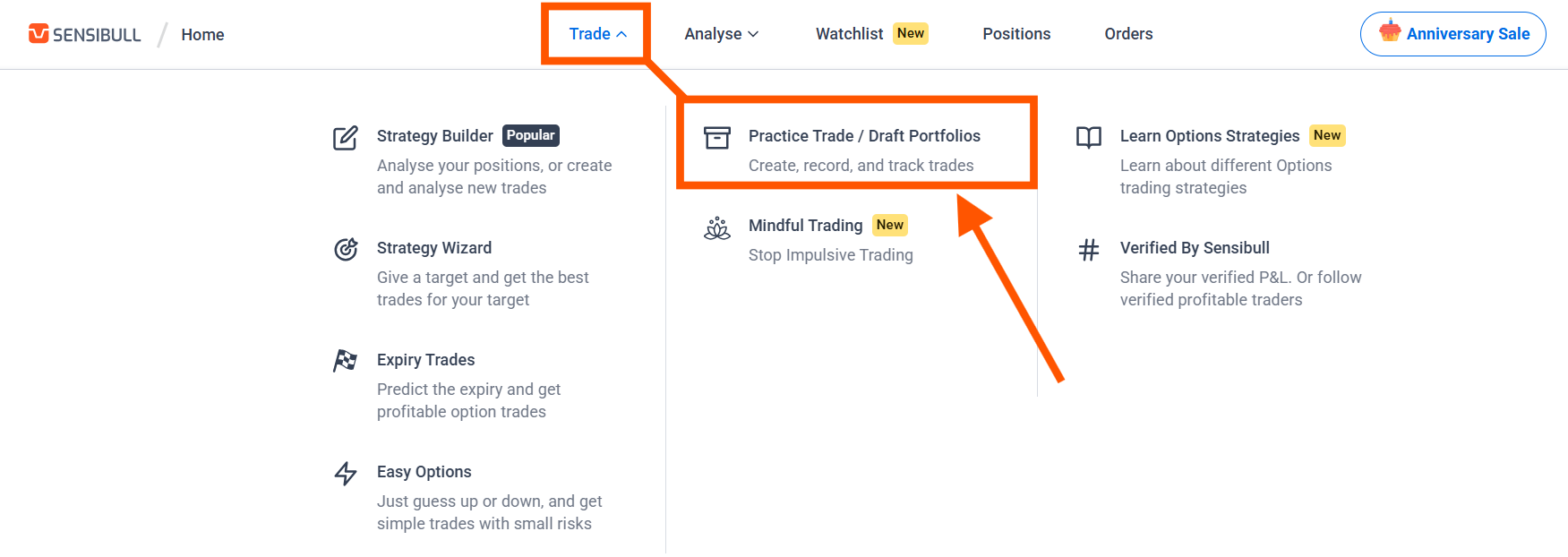
  • After logging in, go to the Trade section in the upper menu.
  • Locate the Practice Trade/Draft Portfolios option and open it.
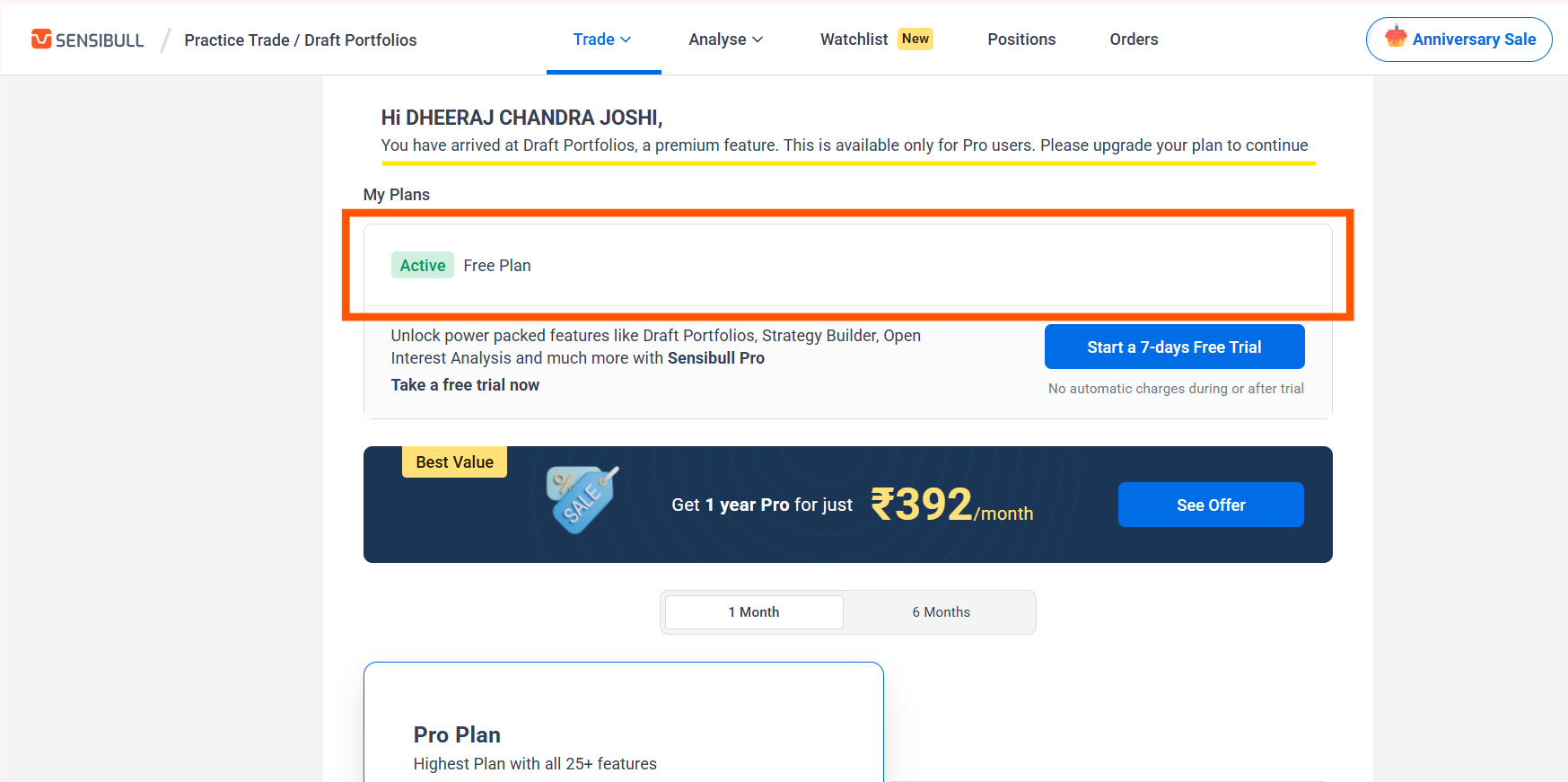
  • Once opened, it will say that you can’t do paper trading because you have a free plan.

In conclusion, no.

Unlike Zerodha, Upstox offers only a free plan that won’t let you do paper trading on a PC.


How to Do Paper Trading on Upstox on your Mobile?

However, Upstox allows you to do paper trading on the Sensibull mobile app – even with a free plan – as long as you log in using your Upstox account.

  • Go to the Play Store or App Store and download the Upstox application.
  • Open the app and create a demat account if it is not already created.
  • After the account becomes active, go back to the Play Store or App Store.
  • Search for Sensibull and download the application.
  • Open the Sensibull app and login using Upstox credentials.
  • After logging in, you will be in the ‘Home’ section.
  • Click on Practice Trade/Draft Portfolios option and start practicing.

Paper trading does not require any real money. The platform provides virtual capital for practice, and all trades are simulated but based on real market data. This helps in understanding market behavior without financial risk.

After setting up, trading can be practiced in segments like Nifty, Bank Nifty, stock options, and futures. Traders can execute trades, such as buying calls and puts or selling options.

It is also possible to test different strategies like straddles and iron condors, observe how option premiums move, and improve risk management and position sizing skills.


Important Considerations

Paper trading does not involve real emotions like fear or greed, so real trading can feel very different. The focus should be on consistency and learning rather than just profits.

It is also important to practice risk management right from the start.


Does Upstox allow paper trading?

No, Upstox does not support paper trading directly. However, you can do paper trading indirectly via Sensibull on your mobile if you have an active Demat account with Upstox.

How do I switch to paper trading with Upstox?

To practice paper trading with Upstox in the Indian financial markets, you must have a Demat account with them. Once your account is active, log in to Sensibull using your Upstox credentials on your mobile; from there, you can practice under the ‘Virtual Trading’ option.

3 Easy Ways to Enable Candlestick Timer in TradingView

Many trading strategies depend heavily on candle close confirmation, especially setups where entries, exits, or validations are considered reliable only after a candlestick has fully completed its formation.

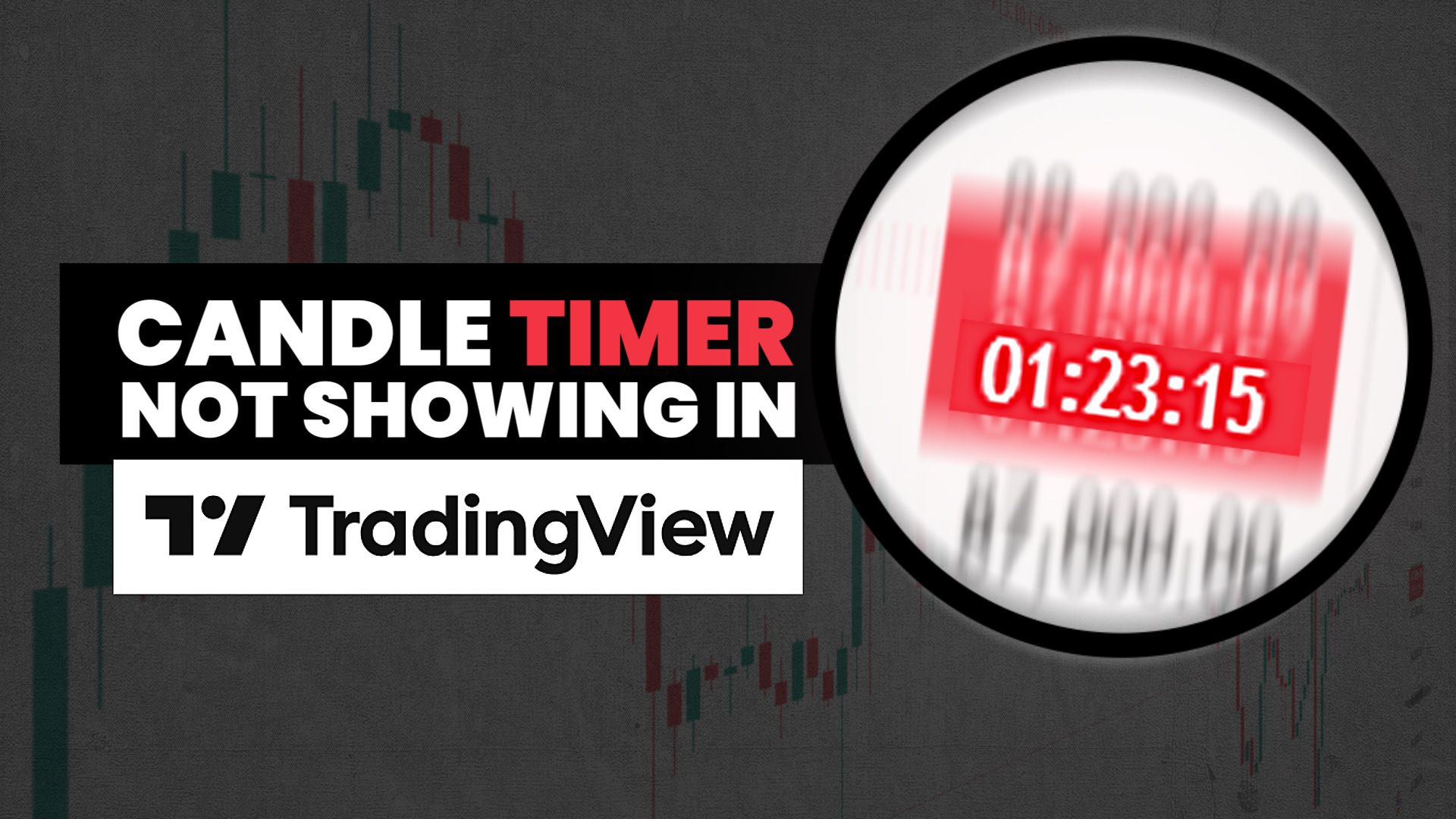
In such cases, the candlestick close timer, officially called the ‘Countdown to Bar Close’, becomes an essential visual tool. This timer shows how much time remains before the current candle closes, helping traders avoid premature decisions and emotional entries during an unfinished price move.

Why the ‘Countdown to Bar Close’ Sometimes Disappears?

In TradingView, this feature can disappear if chart settings are changed unknowingly while experimenting with customization options.

The candlestick close timer does not vanish due to a system error or platform limitation. In most cases, it is turned off unintentionally when users adjust time scale settings, modify chart preferences, or experiment with visual layouts.

Since TradingView offers extensive chart customization, it is very easy to disable certain display elements without realizing their importance at the moment.

Also Read – 3 Easy Methods to Hide Candlesticks in TradingView


If your candle time is not showing, here are 3 simple methods to enable the candle timer for any timeframe in TradingView.

Method One: Enabling the ‘Countdown to Bar Close’ from Chart Settings

The most direct and controlled way to bring back the candlestick close timer is to enable it manually from the chart settings.

Right-click anywhere on the chart and open Settings. Then go to the Scales and Lines section and look for the option called ‘Countdown to Bar Close.’ Simply tick this option.

Once enabled, the countdown timer immediately appears on the price chart and starts showing the remaining time for the active candlestick on TradingView.

This method is ideal for traders who want to keep their existing chart layout, indicators, and visual preferences unchanged while restoring only the missing timer.

The most straightforward and controlled way to restore the candlestick close timer is to enable it manually through the chart settings.

Alternatively, you can access the Scales and Lines option by right-clicking directly on the price scale. Select More Settings, and then follow the same steps under Scales and Lines as explained above.

Method Two: Fix Candle Timer from Labels Menu

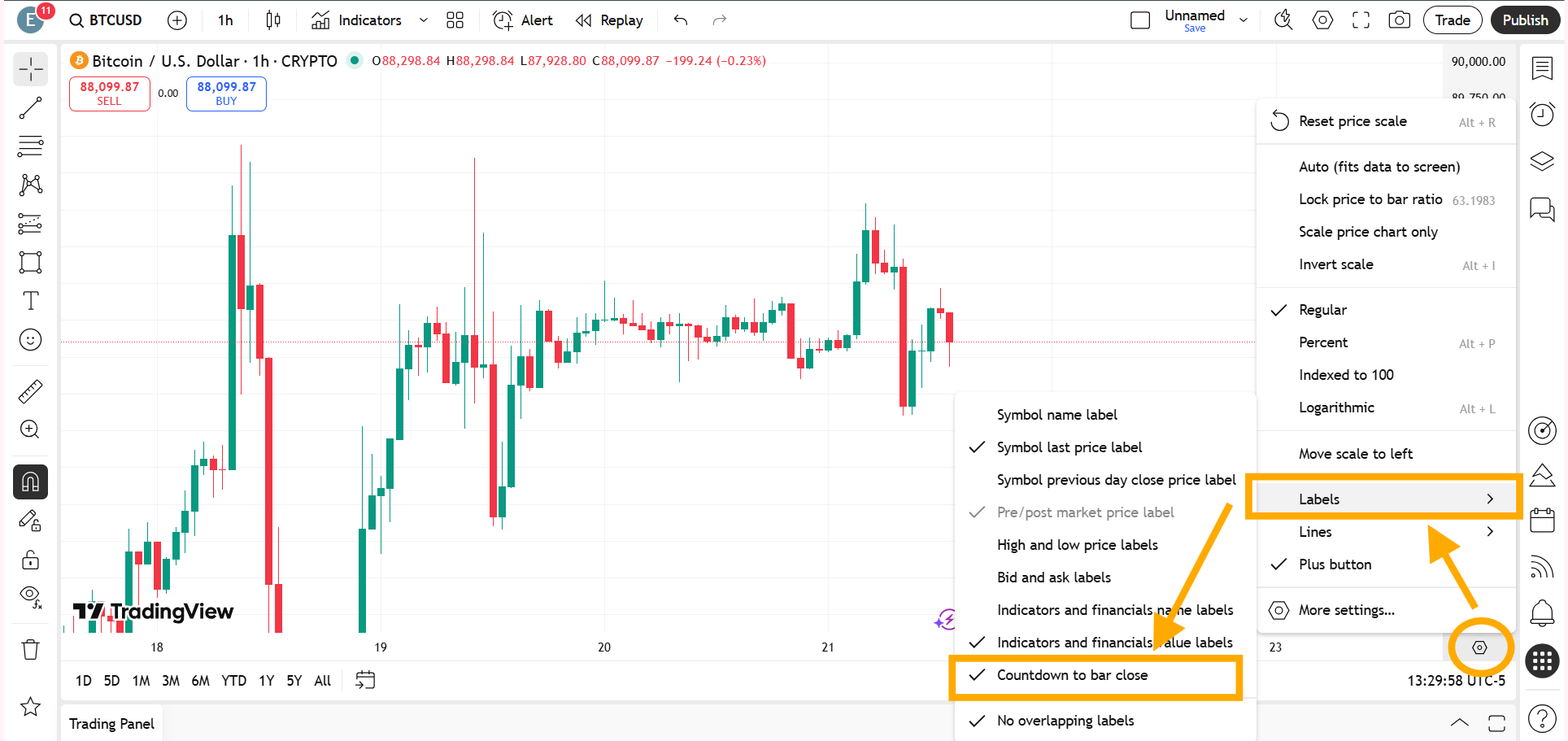
Click on the settings icon at the bottom of the price scale of the trading instrument and go to Labels.

When you hover your cursor over Labels, several options will appear. Find Countdown to Bar Close and enable it.

Once selected, the timer will start showing again.

You can restore the candle close timer by clicking the settings icon at the bottom of the price scale in TradingView, navigating to Labels, and enabling Countdown to Bar Close.

Method Three: Restoring the Timer by Resetting the Chart to Default

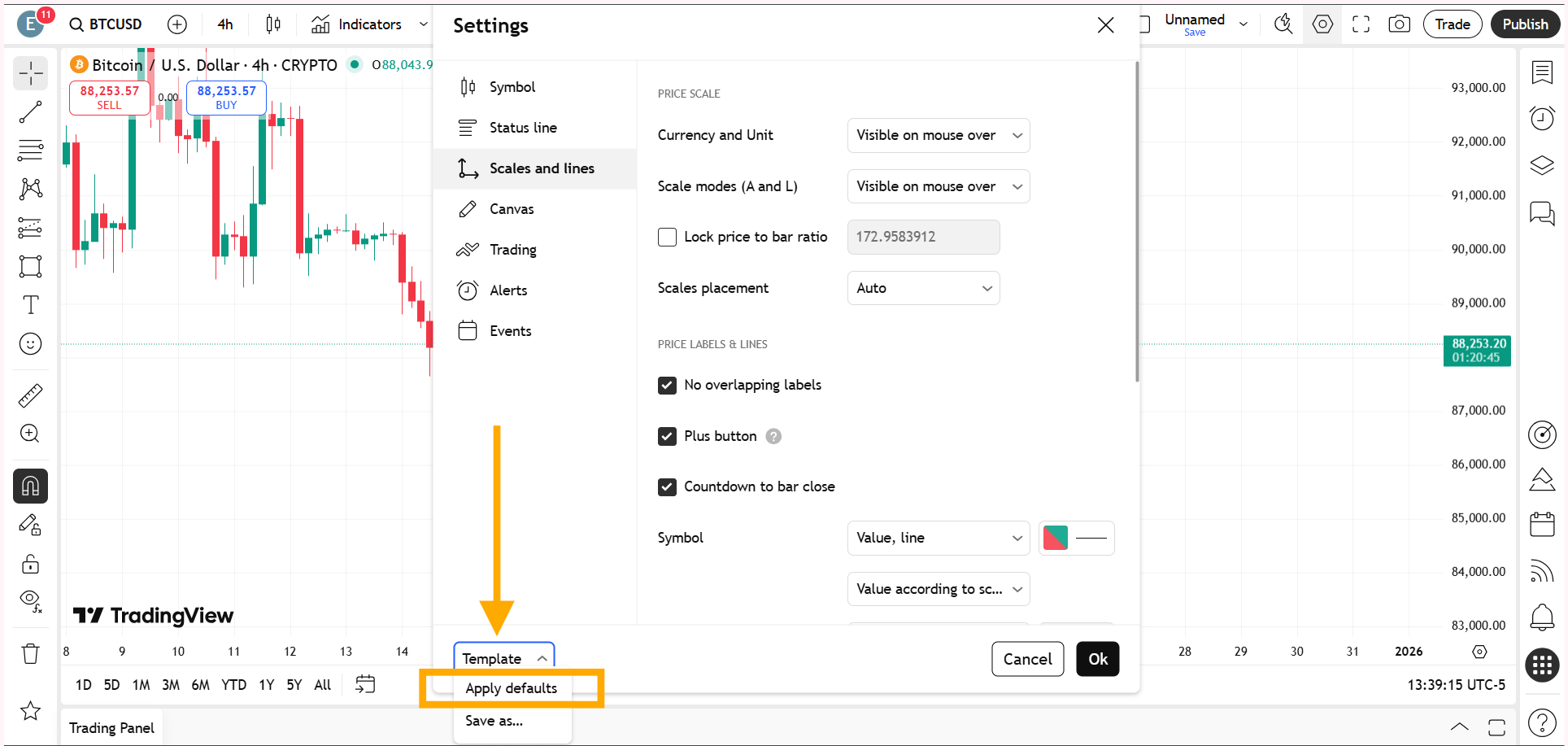
Another effective way to enable the candlestick close timer is by resetting the chart to its default configuration.

Because the Countdown to Bar Close is included in TradingView’s default chart layout, resetting the chart automatically brings the timer back along with the standard visual settings.

Since the Countdown to Bar Close is part of TradingView’s default chart setup, resetting the chart automatically restores the timer along with other standard visual settings.

By reverting the chart to its original state, all hidden or disabled features, including the candlestick close timer, become visible again.

While this approach may remove some customizations, it provides the fastest solution when troubleshooting becomes confusing or time-consuming.


Also Read – Candlesticks Not Showing or Visible in TradingView? – Complete Solution Guide

Which Method Should You Use?

All the methods ultimately lead to the same result, but the choice depends on the trader’s specific situation.

If the chart is heavily customized and only the timer is missing, manually enabling the ‘Countdown to Bar Close’ is the better option.

On the other hand, if multiple chart elements are behaving unexpectedly or the cause of the missing timer is unclear, resetting the chart to default can save time and effort.


For a better understanding, watch the full video below.

This article is for informational purposes only and should not be considered financial advice. Investing in stocks, cryptocurrencies, or other assets involves risks, including the potential loss of principal. Always conduct your own research or consult a qualified financial advisor before making investment decisions. The author and publisher are not responsible for any financial losses incurred from actions based on this article. While efforts have been made to ensure accuracy, economic data and market conditions can change rapidly. The author and publisher do not guarantee the completeness or accuracy of the information and are not liable for any errors or omissions. Always verify data with primary sources before making decisions.
What time do the 4 hour candles close?

The answer is already contained in the question itself. A 4-hour candlestick closes exactly four hours after it opens. After every four hours, the current candle closes and a new 4-hour candle begins, which will again close after the next four hours. This happens only when the selected timeframe is set to 4H.
On TradingView, you can check the remaining time for a candle to close on the right-side price scale by enabling the candle close timer. This shows how much time is left before the current 4-hour candle closes.

Candlesticks Not Showing or Visible in TradingView? – Complete Solution Guide

When candlesticks are not showing or visible in TradingView, the issue is usually straightforward once you know where to look. Whether it is caused by unticked candle settings, hidden objects, an accidental chart type switch, a color clash, or extreme zoom levels, each of these problems can be resolved directly from the chart interface.

If you open a chart and suddenly notice that candlesticks are missing, invisible, or seem to have disappeared, it can be frustrating – especially when you are actively analyzing the market. This is one of the most common TradingView chart problems and is often mistaken for a loading issue or platform bug. In reality, candles not showing on TradingView is usually caused by a few specific settings or visual conflicts that can be fixed within seconds.

This article explains all the major reasons why a TradingView chart is not showing candles and shows you exactly how to unhide candlesticks on TradingView step by step.

Why Candlesticks Disappear on TradingView?

The root cause is rarely a server-side issue. In most cases, the chart is working perfectly, but certain visual settings, chart types, or zoom levels make the candles invisible.

Understanding how TradingView handles chart styles, object visibility, and color settings will help you quickly diagnose and fix the problem.

Also Read – 3 Easy Methods to Hide Candlesticks in TradingView

5 Possible Reasons Why Candlesticks Are Not Showing in TradingView

When candles are not showing or visible in TradingView, the solution is usually simple once you know where to look. Most issues can be fixed directly from the chart interface in just a few seconds.

Before learning how to bring candles back on a candlestick chart, first make sure you are on the correct instrument. For example, in my case, the instrument is BTCUSD.

Below are the five most common reasons candlesticks are not showing on TradingView.

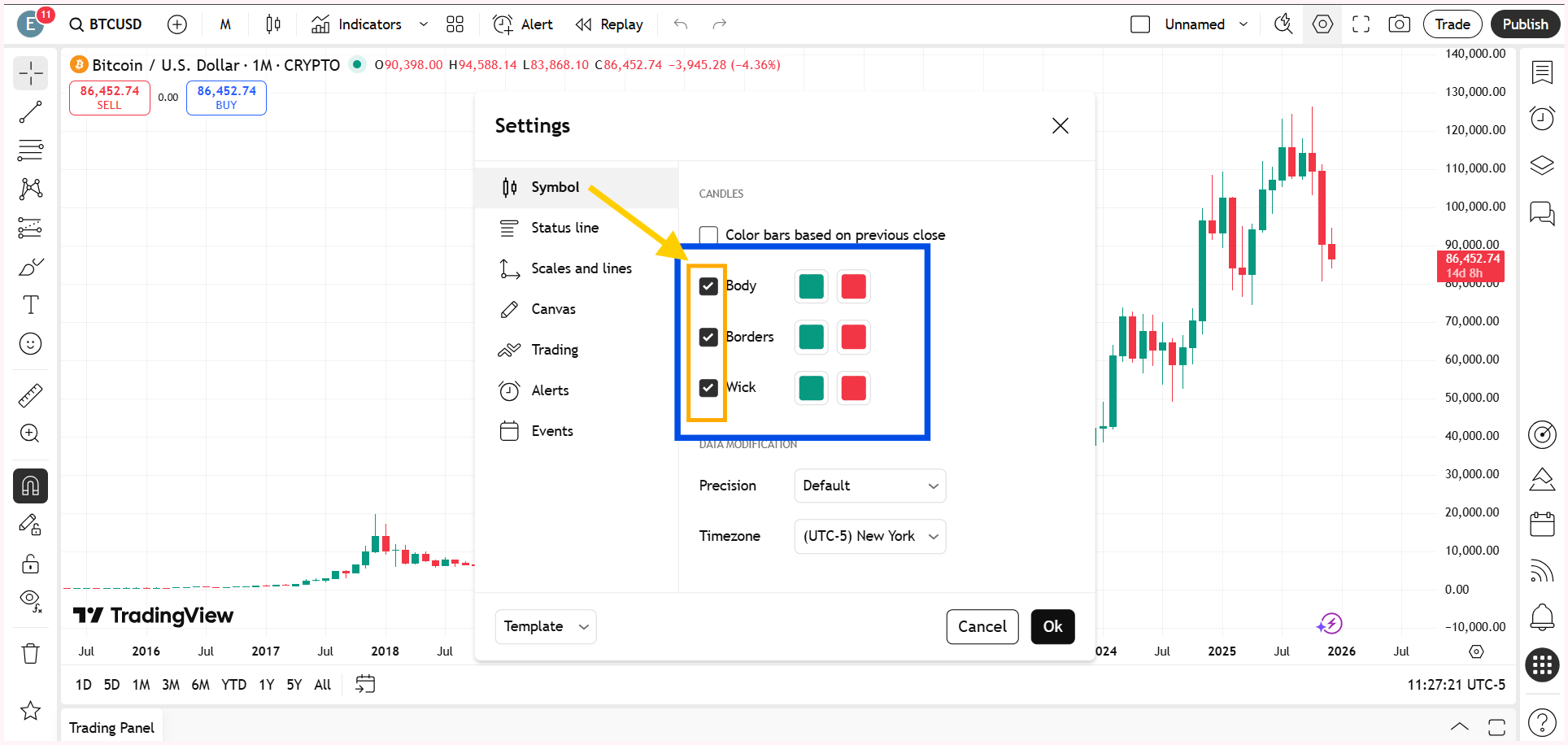
Body, Wick, or Border Accidentally Unticked in Chart Settings

One of the most overlooked reasons for candles not showing on TradingView is related to candle style settings. TradingView allows you to individually control the visibility of the candle body, wick, and border. If the body, wick, or border option is unticked, the candles technically exist on the chart but are not visible.

So, right-click on the chart and go to Settings. Within the Symbol option, make sure the body, wick, and border are ticked.

Right-click anywhere on the chart and open Settings. Inside the Symbol section, ensure that the body, wick, and border options are enabled.

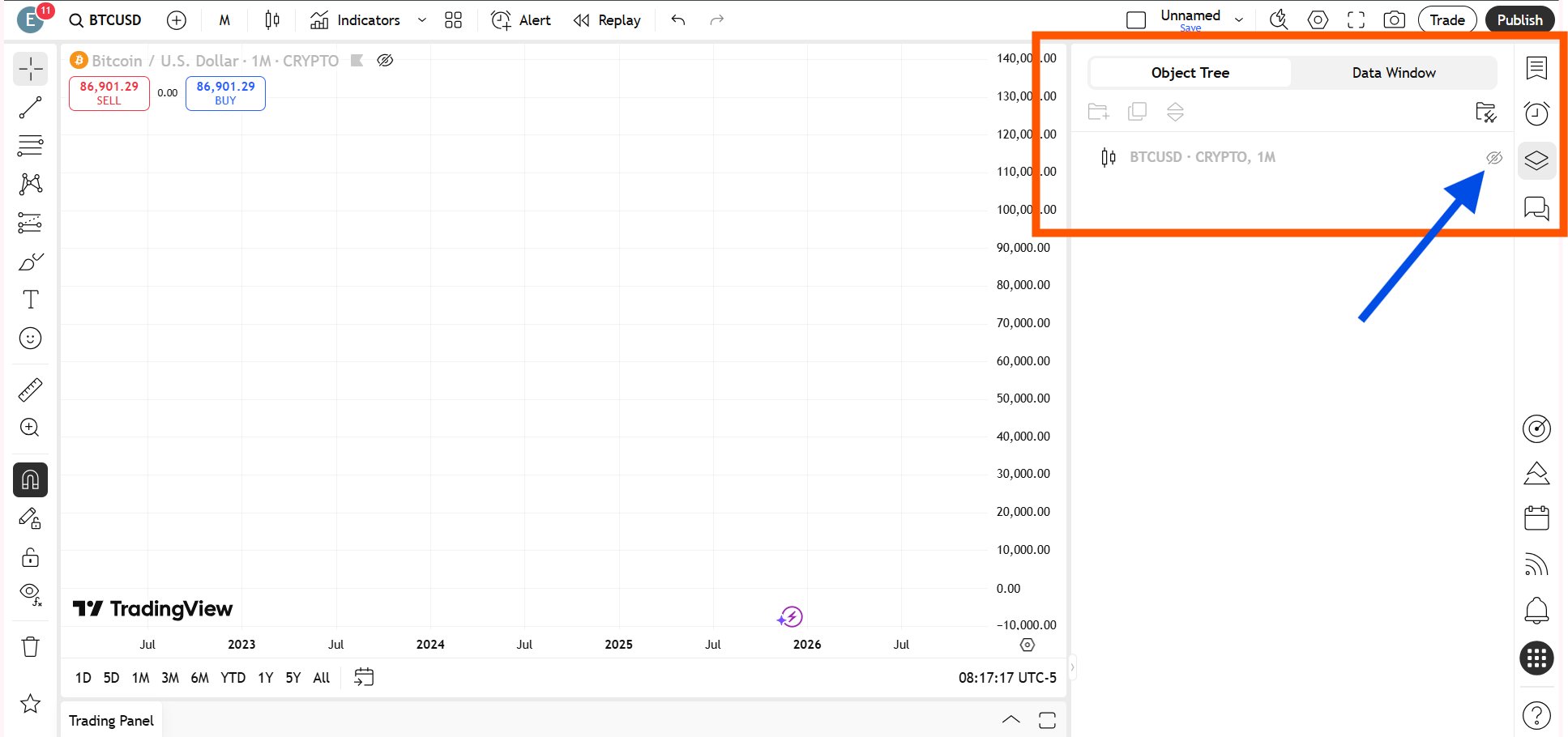
Candles Hidden from the Object Tree or Data Window

Another common TradingView chart problem occurs when candle visibility is disabled through the object tree or data window.

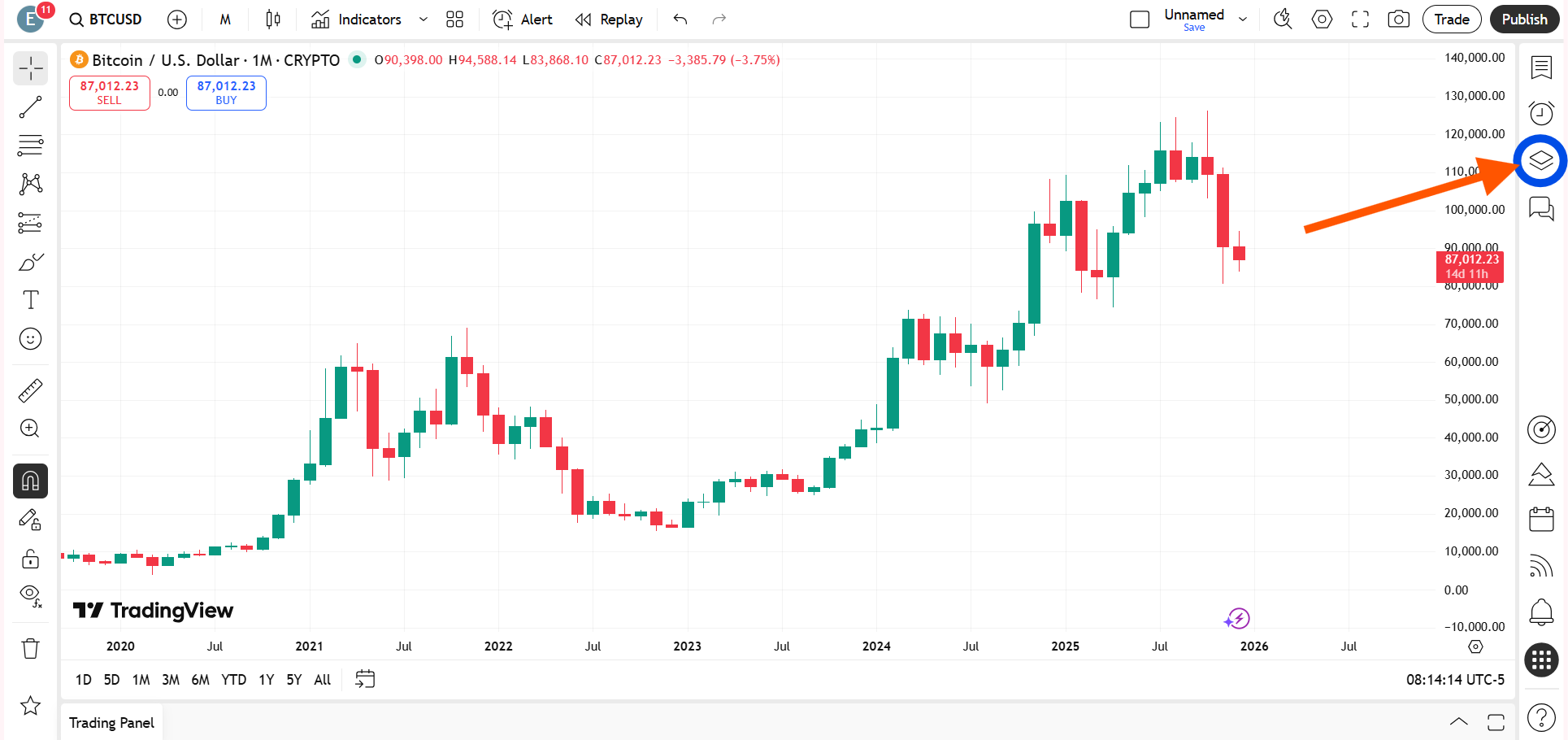
Just click on the Object Tree and Data Window on the right-side toolbar and check whether the eye icon is turned on or off.

By opening the object tree or data window and turning visibility back on, you can immediately unhide candles on TradingView.

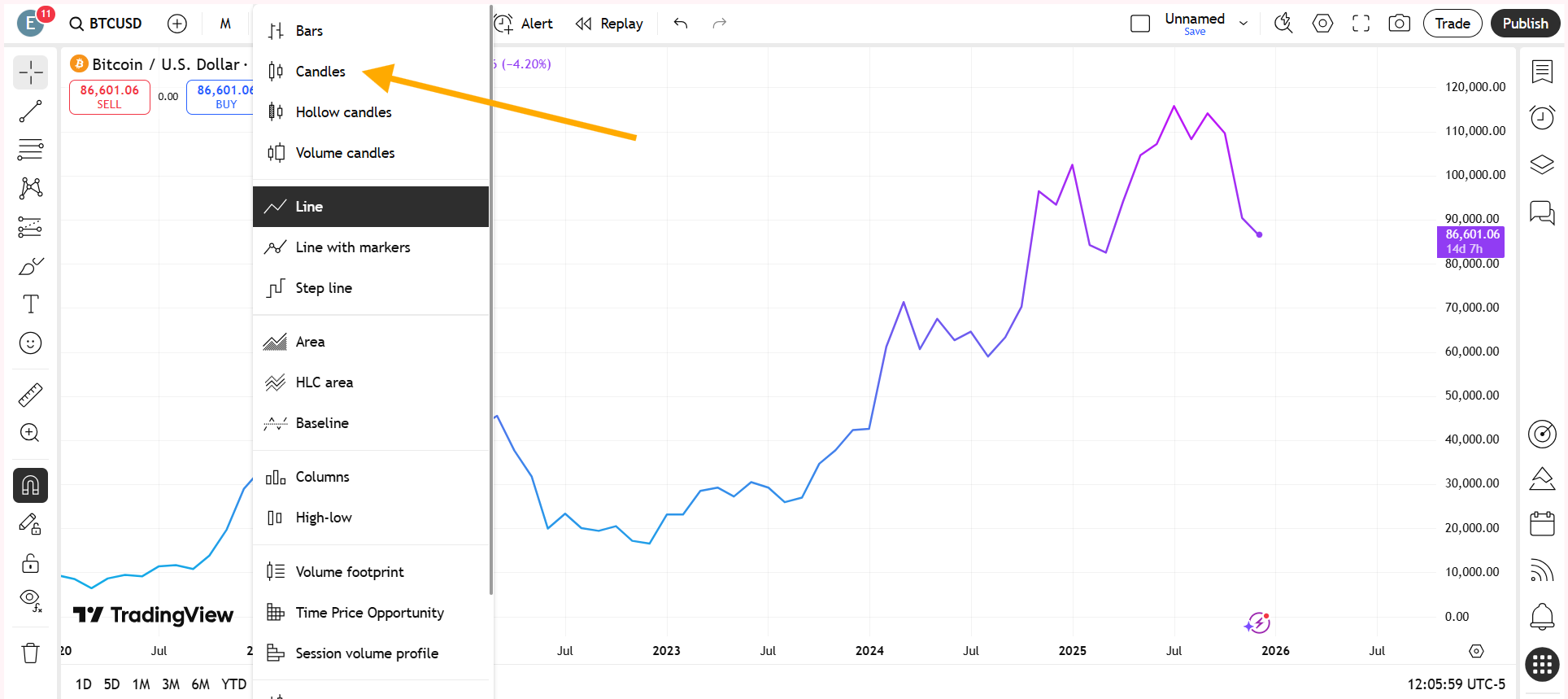
Switched to a Different Chart Type by Mistake

You may have accidentally changed the chart type to something like a line chart, and that is why you are no longer seeing candlesticks.

When the chart type is switched away from candlesticks, the candles do not disappear due to an error; they are simply replaced by another visual format. Switching the chart type back to candlestick instantly brings the candles back onto the chart, restoring the standard price view used for technical analysis.

How to change a line chart to a candlesticks chart on TradingView?

Open your chart on TradingView. Look at the top-left corner of the chart toolbar and click on the Chart Type icon. This icon usually displays the currently selected chart style, such as a line chart.

Switching the chart type back to candlestick instantly brings the candles back onto the chart, restoring the standard price view used for technical analysis.

From the dropdown menu, select Candlesticks. Once selected, the chart will instantly switch from a line chart to a candlestick chart.

Chart Background and Candle Color Clash

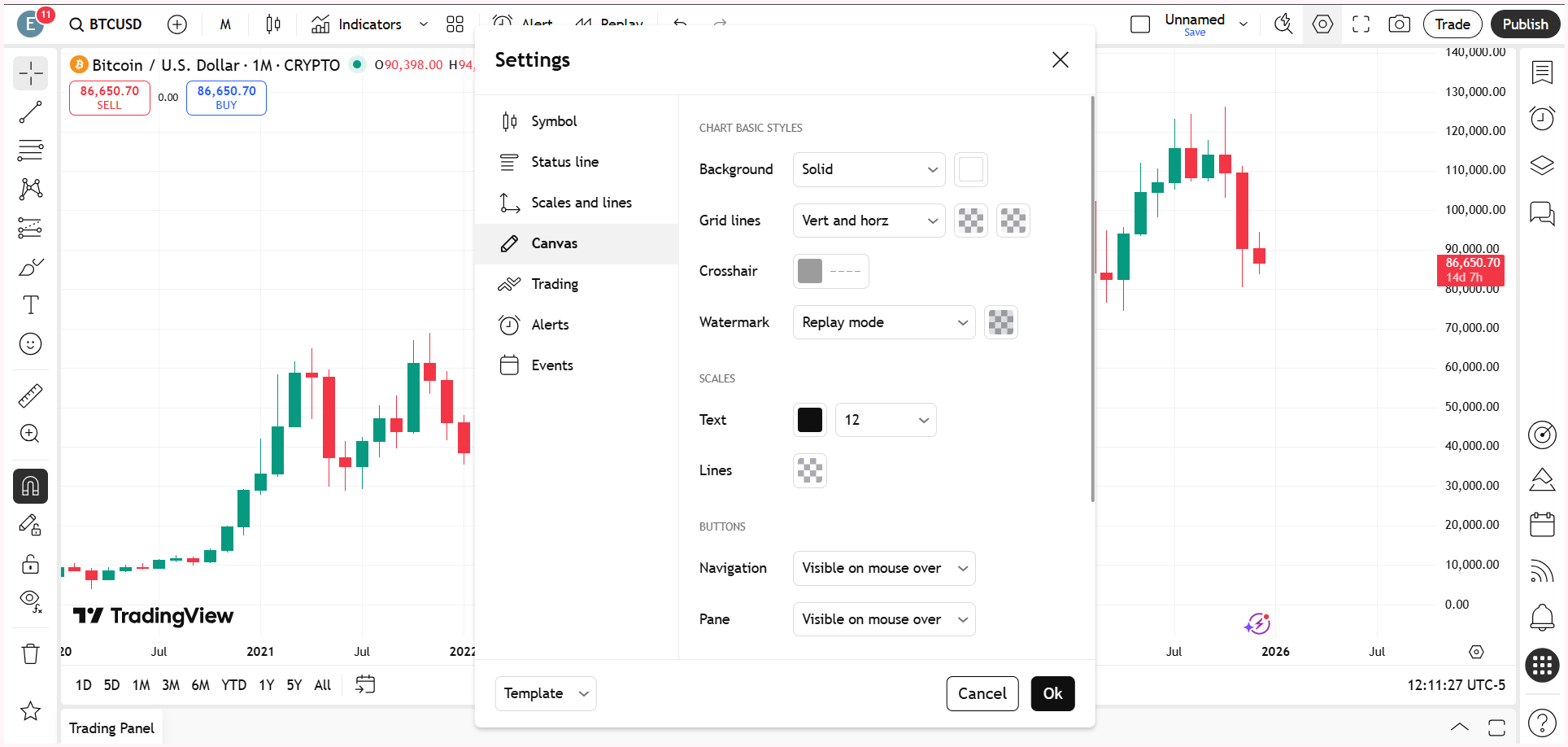
Sometimes the candles are present but completely blend into the chart background. If the candle color is identical or very close to the background color, the chart appears empty even though data is loaded.

This color clash usually occurs after applying a dark or custom theme or importing chart templates from other users.

Changing either the chart background color or the candle body and wick colors can immediately restore visibility and resolve the issue of candlesticks not showing on TradingView, without any technical troubleshooting.

Adjusting either the background color or the candle body and wick colors restores visibility and fixes the TradingView chart not showing issue without any technical troubleshooting.

Also Read – What is the difference between ICT and SMC?

Extreme Zoom Level Hiding Candlesticks

An extreme zoom-in or zoom-out level can also make candlesticks disappear on TradingView. When zoomed out too far, individual candles become too compressed to render clearly. When zoomed in too much, the chart may appear blank because the visible range contains no price data.

Resetting the chart view brings the candlesticks back into view immediately. Alternatively, you can press Alt + R.

This is one of the simplest fixes and should always be checked before assuming a chart loading problem.


Watch the full video below so you don’t miss any important steps.

This article is for informational purposes only and should not be considered financial advice. Investing in stocks, cryptocurrencies, or other assets involves risks, including the potential loss of principal. Always conduct your own research or consult a qualified financial advisor before making investment decisions. The author and publisher are not responsible for any financial losses incurred from actions based on this article. While efforts have been made to ensure accuracy, economic data and market conditions can change rapidly. The author and publisher do not guarantee the completeness or accuracy of the information and are not liable for any errors or omissions. Always verify data with primary sources before making decisions.
Why is My TradingView Chart Not Showing Anything?

When a TradingView chart is not showing, it is usually not a data or server issue. In most cases, the chart is loaded but the candlesticks are hidden due to candle style settings, an accidental chart type change, extreme zoom levels, or visibility being turned off in the object tree or data window. Checking these settings typically restores the chart instantly.

Why is My TradingView Chart Not Loading Properly?

In some cases, a TradingView chart may not load properly due to a temporary technical glitch or a short connectivity issue. This can happen because of browser cache problems, momentary internet interruptions, or brief platform-side delays. When this occurs, simply refreshing the page or reloading the chart usually resolves the issue. If the problem persists, checking your internet connection or reopening the chart in a new tab can help restore normal chart loading on TradingView.

3 Easy Methods to Hide Candlesticks in TradingView

Learn three simple ways to hide candlesticks in TradingView and keep your charts clean, clear, and easy to analyze.

TradingView is one of the most widely used charting platforms among traders and investors. Although candlesticks are the default chart type, there are many situations where traders prefer to hide candlesticks to keep the chart clean and focused.

TradingView does not provide a single dedicated button called “Hide Candlesticks,” but there are three simple and effective methods that allow you to remove candlesticks from your chart.

Why Do Traders Hide Candlesticks in TradingView?

Traders often choose to hide candlesticks to reduce visual clutter and keep their charts clean, simple, and easier to read, especially when too much price detail starts to overwhelm the view. Many do this to focus more clearly on indicators such as moving averages, VWAP, or oscillators, where the signal matters more than individual candle movements. Candlesticks are also hidden when traders want to study key price levels, zones, and overall market structure without unnecessary distractions. In drawing-heavy setups filled with trendlines, boxes, or Fibonacci tools, removing candlesticks helps bring clarity to the analysis and allows traders to concentrate on decision-making rather than noise.

Also Read – Candlesticks Not Showing or Visible in TradingView? – Complete Solution Guide

Method 1: Hide Candlesticks Using Chart Settings in TradingView

This method allows you to completely remove candlesticks by modifying the candlestick appearance settings. It is the most accurate and controlled way to hide candles without changing the chart type.

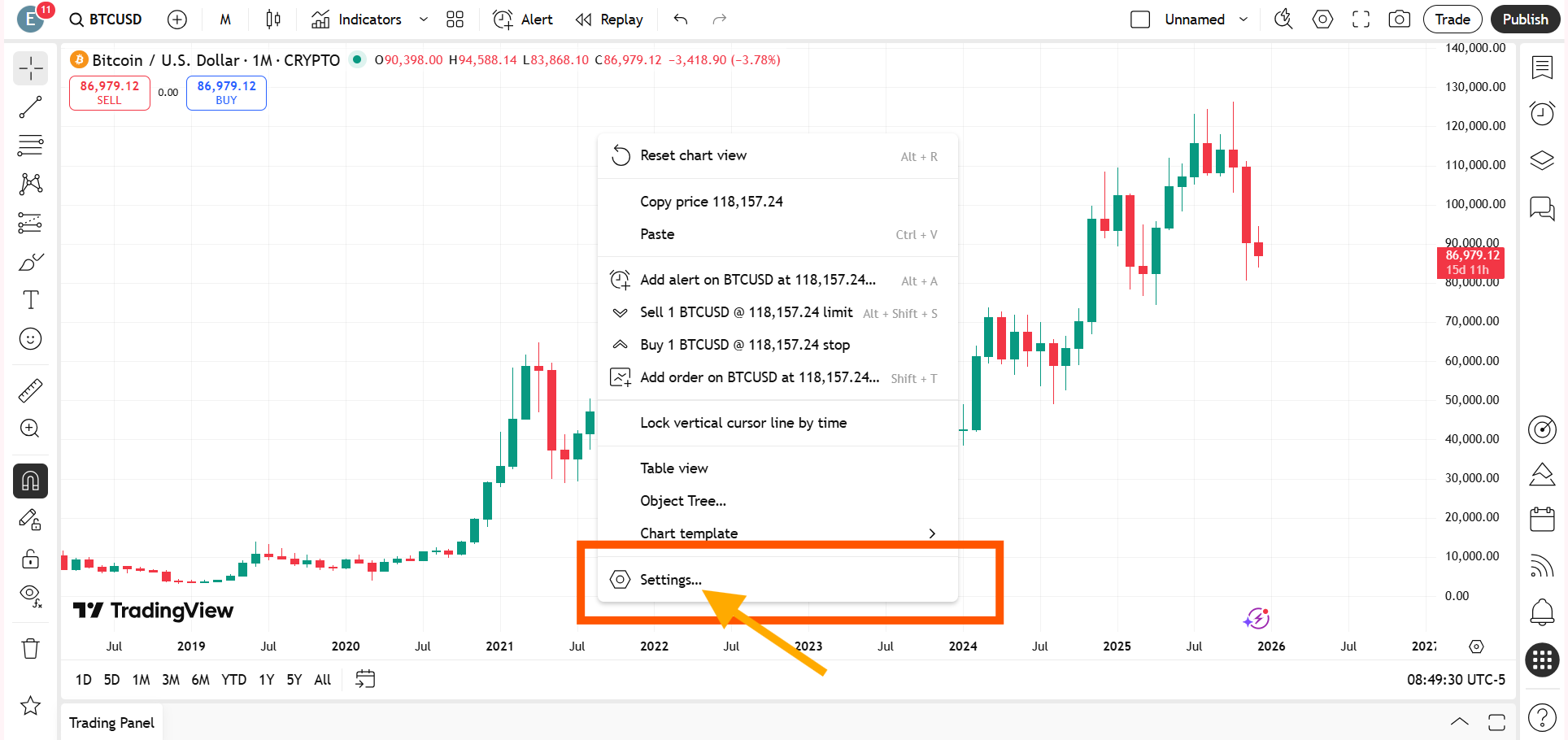
You need to right-click anywhere on the chart in TradingView to open the chart menu, and then click on Settings from the menu options.

Steps:

  1. You need to right-click anywhere on the TradingView chart to open the chart menu.
  2. You need to click on Settings from the menu options.
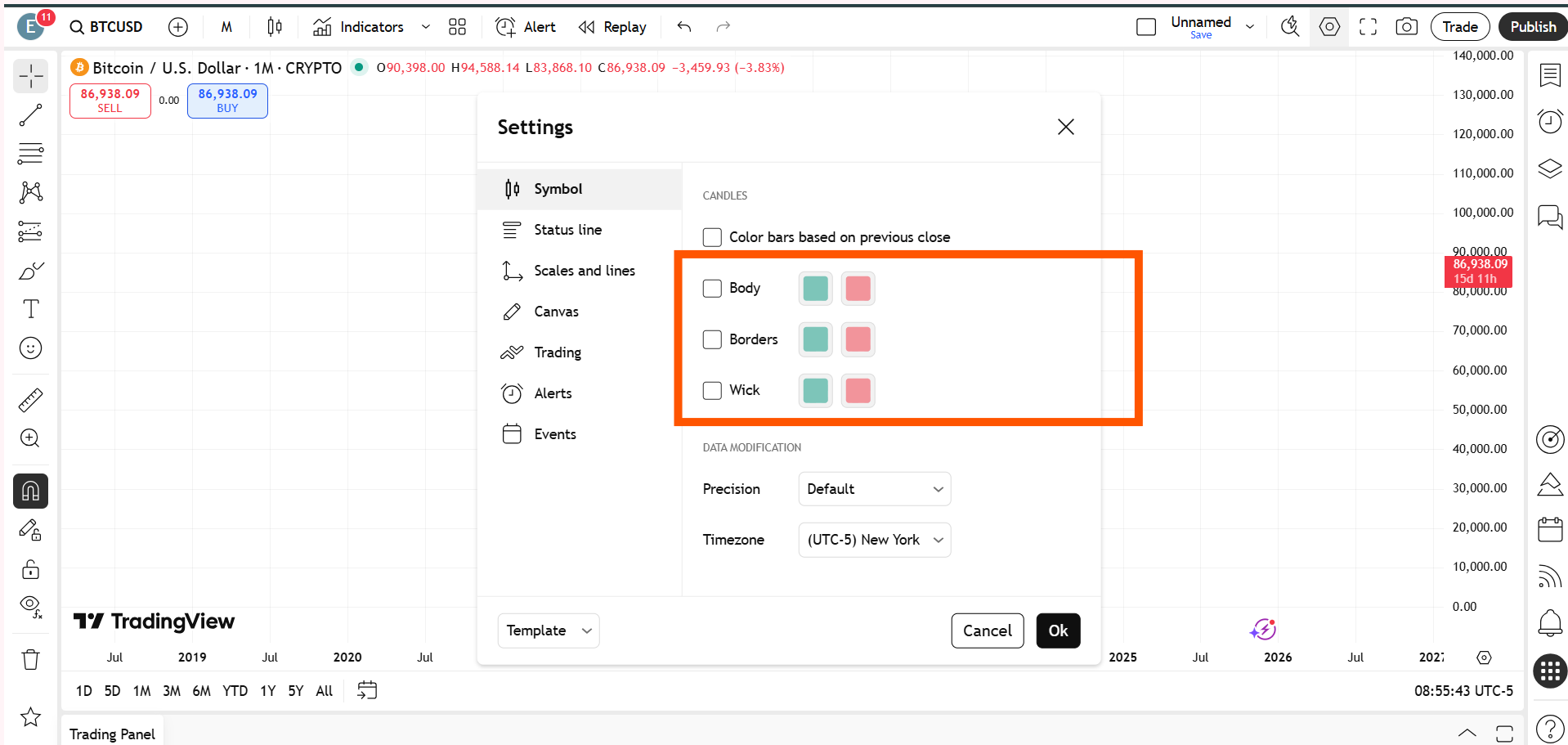
  3. You need to open the Symbol tab inside the settings panel.
  4. You need to uncheck the Body option so that the candle body is no longer visible.
  5. You need to uncheck the Wick option so that the candle wicks disappear from the chart.
  6. You need to uncheck the Border option so that the candle outlines are removed.
  7. You need to click OK to apply the changes.
Once the body, wick, and border are turned off, the candlesticks will no longer be visible on the chart.

After disabling the body, wick, and border, the candlesticks will be completely hidden from the chart.

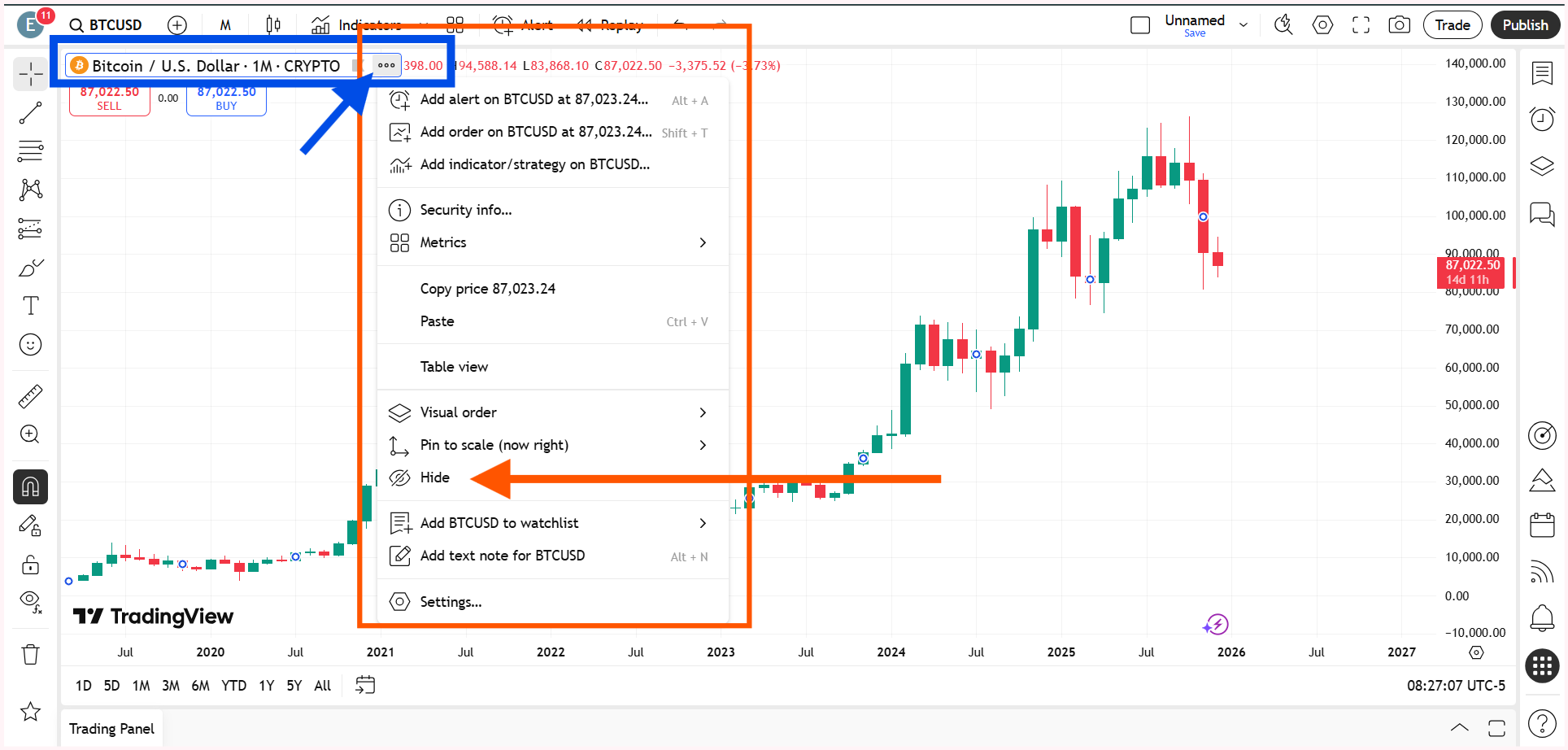
Method 2: Hide Candlesticks from the Top-Left “More” Menu

This is the fastest method to hide candlesticks and works directly from the chart interface without opening detailed settings.

As soon as you click Hide symbol, the candlesticks will instantly disappear from the chart.

Steps:

  1. You need to look at the top-left corner of the chart where the symbol name is displayed.
  2. You need to click on the three dots icon, also known as the More options menu.
  3. You need to select Hide Symbol from the dropdown list.

Once you click Hide symbol, the candlesticks will instantly disappear from the chart.

Also Read – What is the difference between ICT and SMC?

Method 3: Hide Candlesticks Using Object Tree and Data Window

This is probably the easiest and fastest way to hide the candlesticks on the chart.

You can access the Object Tree and the Data Window from the right-side toolbar in TradingView.
  1. You need to open the Object Tree & Data Window from the right-side toolbar in TradingView.
  2. You need to locate the main price symbol inside the Object Tree.
  3. You need to click on the eye icon next to the symbol to hide it from the chart.
You need to click on the eye icon next to the symbol inside the Object Tree or the Data Window to hide the candlesticks from the chart.

Alternatively, you can do the same within the Data Window, using the same option the same option on the right-side toolbar in TradingView.

Both options allow you to control the visibility of candlesticks without altering chart layout or indicator settings.


Watch the video below to avoid missing any important steps.

This article is for informational purposes only and should not be considered financial advice. Investing in stocks, cryptocurrencies, or other assets involves risks, including the potential loss of principal. Always conduct your own research or consult a qualified financial advisor before making investment decisions. The author and publisher are not responsible for any financial losses incurred from actions based on this article. While efforts have been made to ensure accuracy, economic data and market conditions can change rapidly. The author and publisher do not guarantee the completeness or accuracy of the information and are not liable for any errors or omissions. Always verify data with primary sources before making decisions.
SMC-ICT – A Sophisticated Price Action Course for 2026

SMC–ICT Mastery: The Advanced Price Action Framework for 2026

What is SMC?

SMC is simply a smart and efficient way of trading. It is a structured way of approaching the markets.

It is the process of identifying the best liquidity and the best discount zone when you are planning to buy – essentially “thinking like a big bull.”

Or finding the best premium zone when you want to sell – “thinking like a big bear.”

That is the core meaning of Smart Money Concepts.

The universal rules still remain the same:

• The best discount zone is the demand/support zone.
• The best premium zone is the supply/resistance zone.


The SMC vs ICT confusion

There is a common debate about whether SMC originated from ICT (Michael J. Huddleston).

Some argue that concepts like FVG and Order Blocks were introduced by ICT and later repackaged under the name SMC.

ICT claims this himself.

It may be true, or it may not be – we do not have an official conclusion.

But what is clear is that ICT has deep experience in financial markets, and he has introduced many strong concepts. His approach generally goes into micro-level price action analysis.

Modern SMC – or the version that people say is separate from ICT – is somewhat broader than ICT’s complete methodology.

Yes, ICT has a very refined and structured approach. But if we focus purely on the term SMC, its meaning can simply be understood as trading in a smart way to capture the best liquidity and get the best price – whether you are a buyer or a seller.

There was a well-known trader, David Paul, who was also involved in trading education. He used a smart method that we now call a “liquidity sweep,” long before the term existed.

He used to say he places entries where the masses have placed their stops. A good trade is often a difficult trade. Large players can influence the market easily – this aligns with modern AMD where “M” stands for manipulation.

So, you could call it David’s smart technique of trading.

And similarly, ICT (Michael J. Huddleston) has his smart technique of trading.

Ultimately, it depends on what you choose to follow.

The controversy will resolve when the right time and evidence come. It does not need to be our focus here.

Also Read – ICT (Michael J. Huddleston)-Biography, Net Worth, YouTube Channel, Family & Trading Success


What we will do here?

We follow a simple framework:

Technical Analysis < Price Action < Smart Money Concept < ICT-SMC (the refined approach from Michael J. Huddleston)

Also Read –What is the difference between ICT and SMC?

Yes, we believe in ICT’s work. And yes, if someday strong verification proves that concepts like OB and FVG were first introduced by ICT, we would have no hesitation in accepting that.

But our approach starts broadly, using classical support–resistance theories, and then moves deeper.

Stay tuned for further learning.

This article is for informational purposes only and should not be considered financial advice. Investing in stocks, cryptocurrencies, or other assets involves risks, including the potential loss of principal. Always conduct your own research or consult a qualified financial advisor before making investment decisions. The author and publisher are not responsible for any financial losses incurred from actions based on this article. While efforts have been made to ensure accuracy, economic data and market conditions can change rapidly. The author and publisher do not guarantee the completeness or accuracy of the information and are not liable for any errors or omissions. Always verify data with primary sources before making decisions.
Understanding Open Interest and Its Connection with Price Movement

In futures trading, for every new contract created, there’s one buyer (long) and one seller (short). That’s what forms 1 unit of open interest.

In futures and options trading, one of the most misunderstood terms is Open Interest. Many new traders look only at price movements, but smart traders also track open interest because it tells us how much interest or participation is building in a particular trend.

To truly understand market psychology, it is important to know what open interest means and how it interacts with price changes.


What Is Open Interest?

Open Interest, often written as OI, refers to the total number of active contracts that have not yet been settled.

Each contract involves two sides – one buyer who is going long and one seller who is going short.

So, when a new futures contract is created, both a long and a short position are formed at the same time. That means technically the number of bulls and bears is always equal in open interest.

However, what matters is not who is right at the moment but which side is stronger and more confident about the direction of the market. This confidence is what gets reflected through the price trend and the changes in open interest.

Also Read – What is Delta Based Open Interest?


The Role of “Interest” in Open Interest

The key word here is “Interest.”

When open interest rises, it means more traders are entering the market and showing interest in that particular price move.

It is not just about the number of contracts, but about how many participants believe in the ongoing trend strongly enough to take new positions.

If the open interest is going up, it means new money is flowing into the market. More people want to participate. This adds strength to the current trend – whether it is upward or downward.


When Price and Open Interest Both Rise

Now imagine that the price of a futures contract is rising [When traders believe that the underlying asset’s price (say gold, crude oil, or Nifty) will go up in the future, they rush to buy futures contracts now. This extra demand lifts the futures price.] and the open interest is also increasing.

What does that tell us? It means that more traders are opening new positions because they believe the price will continue to move higher.

In simple terms, bulls are getting stronger. They see the uptrend as a confirmation that the market may go even higher, so they want to lock in the current price.

By entering long positions in the futures market, they ensure that even if the asset price rises further, they have already secured a position at a relatively cheaper rate.

This rising open interest confirms that the buying conviction is strong and that the trend has real participation behind it, not just temporary movement.

The Other Side of the Coin – Short Sellers

But for every long position in the market, there is a short position. That means for every trader who believes prices will rise, there is another who believes prices will fall.

So, open interest alone does not tell us which side is winning. It only tells us that more people are becoming involved.

However, when we combine open interest with price movement, we can start to see the real story. If the price continues to rise despite equal numbers of long and short positions, it means bulls are overpowering the bears. The short sellers are getting squeezed, and their losses are adding more fuel to the upward momentum.


What Happens During a Downtrend?

The same logic applies during a fall in price. When the price is dropping and open interest is rising, it means more traders are entering the market expecting further decline. In that case, it is the bears who are showing conviction. They believe that the trend is strong enough to continue lower, so they take short positions confidently.

Just like in a rising market where bulls dominate, in this case, bears dominate the sentiment.

Rising open interest during a falling price indicates that traders are actively betting on the downside and that the selling pressure is supported by real participation, not just panic.


Falling Open Interest and Its Implications

If open interest starts to fall while the price is moving either up or down, it means traders are closing their positions.

The enthusiasm for that trend is weakening. If the price is rising but open interest is falling, it could mean that the rally is losing strength. Traders who were long may be taking profits, and fewer new participants are entering.

Similarly, if the price is falling and open interest drops, it means shorts are covering their positions, possibly expecting a reversal soon.

In short, falling open interest means lack of conviction, while rising open interest shows growing confidence in the current direction.


Let us connect the dots step by step. When traders expect prices to move in a particular direction, they enter new contracts. These new contracts increase open interest. As demand for these contracts rises, it influences the market price. If more buyers are eager, the price goes up. If more sellers are dominant, the price goes down. As the price continues to move in the same direction and open interest also rises, it confirms that new participants agree with that trend. The flow of fresh money strengthens momentum and extends the movement further. This is the causal effect of rising open interest on price trends – participation leads to momentum, and momentum attracts more participation, creating a reinforcing cycle until conviction begins to fade.


Final Understanding

So, to sum it up, open interest is not just a number. It is a reflection of how interested traders are in the current price direction.

When open interest rises along with price, bulls are in control and believe in further gains.

When open interest rises with a falling price, bears are confident and expect more downside.

Even though the number of long and short positions is always equal, it is the price action that reveals which side is dominating.

Understanding this relationship between price and open interest helps traders see the conviction behind every move, rather than just following the surface-level price change.

This article is for informational purposes only and should not be considered financial advice. Investing in stocks, cryptocurrencies, or other assets involves risks, including the potential loss of principal. Always conduct your own research or consult a qualified financial advisor before making investment decisions. The author and publisher are not responsible for any financial losses incurred from actions based on this article. While efforts have been made to ensure accuracy, economic data and market conditions can change rapidly. The author and publisher do not guarantee the completeness or accuracy of the information and are not liable for any errors or omissions. Always verify data with primary sources before making decisions.
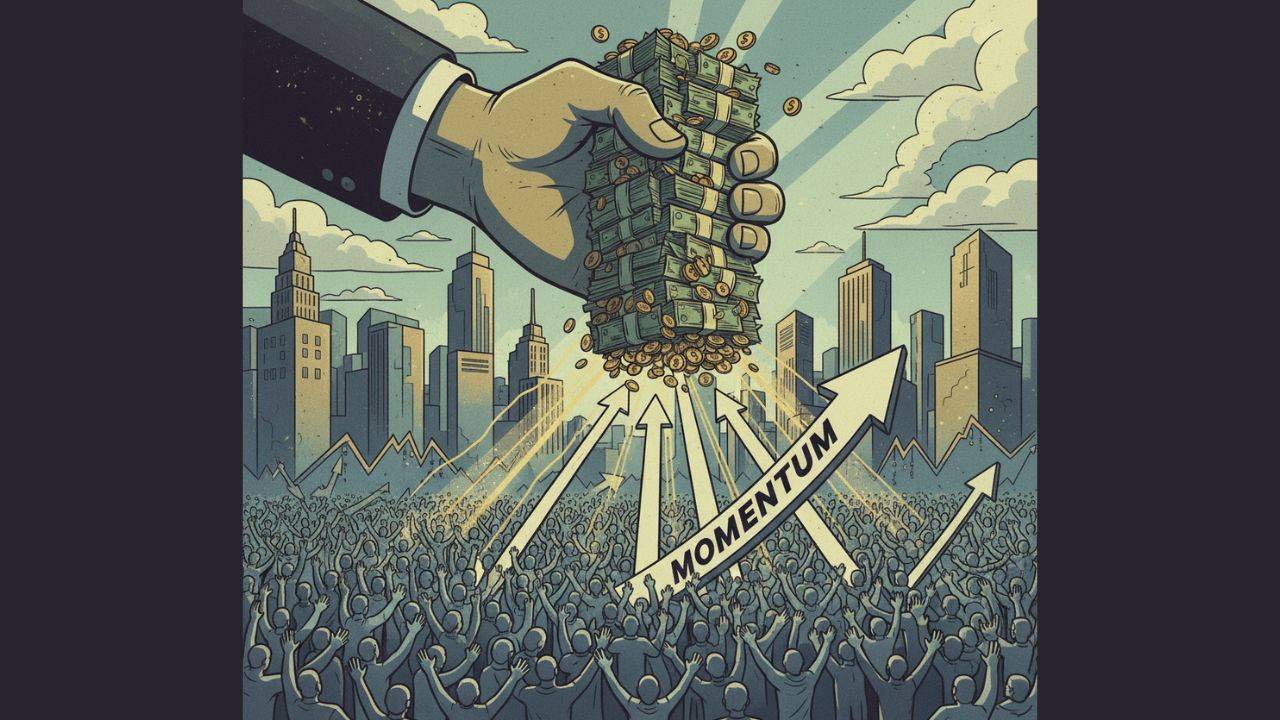
The Majority of Money, Not People, Drives Market Momentum

market trends are not driven by the crowd of people but by the crowd of money

In financial markets, it may seem that prices and momentum are shaped by the sheer number of participants trading every day.

But the true engine behind market trends is not the majority of people, rather the majority of money. Demand, supply, and price movements depend on the flow and weight of capital, not on how many individuals are involved.

Why Money Matters More than People?

Every buy or sell order in the market is not equal. A small retail investor purchasing 10 shares exerts far less influence than an institutional investor executing trades worth billions. Think of it in simple terms:

  • If 1,000 small traders each buy $100 worth of a stock, the total demand equals $100,000.
  • But if a hedge fund executive buys $100 million worth of the same stock, their single order outweighs the combined impact of thousands of individual investors trading much smaller amounts.

Thus, the market does not measure participation by number of people but by the volume of money moving in and out of assets.

Institutions as Momentum Drivers

Major institutional players such as mutual funds, hedge funds, pension funds, and sovereign wealth funds control enormous pools of capital. Their trading decisions – shifting allocation between asset classes, sectors, or specific stocks – create waves that retail traders often ride after the move has already begun.

When an institution decides to build or exit a large position, it alters visible supply and demand. This shift pulls prices strongly in one direction, creating momentum. Retail traders amplify moves only marginally compared to institutional capital.

The Illusion of the Crowd

At first glance, markets like crypto or retail-heavy penny stocks seem to reflect the behavior of large crowds of small traders. However, even here, the largest holders – so-called “whales” – exert outsized influence. A few wallets selling millions in crypto can crash prices more severely than thousands of small trades.

This underscores the principle – money concentration outweighs participation numbers.

Also Read – I Created the Best Bitcoin Guide You’ll Ever Read

Real Demand and Supply

Market textbooks define supply as the willingness of sellers to sell, and demand as the willingness of buyers to buy at a price level.

But in practice, willingness without capital is powerless. True demand shows up only when substantial money flows into an asset. Likewise, true supply becomes visible when large capital decides to exit.

Therefore:

  • High demand = majority of capital flows into buying
  • High supply = majority of capital flows into selling
  • Momentum = imbalance in capital allocation, not imbalance in headcount

You’ll want to read this next – What is IBZ and ISZ in Trading? – Important Points to Know

Practical Implications for Traders

  1. Follow the money, not the crowd. Looking at institutional flows, volume analysis, and open interest gives more reliable signals than social media chatter.
  2. Understand market psychology at scale. Retail psychology matters in building sentiment, but only big capital decides how far and how fast markets move.

The Bottom Line

Market movements are not democratic – they are capitalistic. One trader with a billion dollars exerts more influence than a million traders with a single dollar each. True demand and supply are expressed not by the majority of traders but by the majority of money. For investors and traders seeking to understand momentum, the most valuable question is not “How many people are buying?” but “How much capital is buying?”

This article is for informational purposes only and should not be considered financial advice. Investing in stocks, cryptocurrencies, or other assets involves risks, including the potential loss of principal. Always conduct your own research or consult a qualified financial advisor before making investment decisions. The author and publisher are not responsible for any financial losses incurred from actions based on this article. While efforts have been made to ensure accuracy, economic data and market conditions can change rapidly. The author and publisher do not guarantee the completeness or accuracy of the information and are not liable for any errors or omissions. Always verify data with primary sources before making decisions.

Understanding Gold (XAUUSD) Trading – A Beginner’s Guide

Gold has been valued by humans for thousands of years. In ancient times, people used it to make jewelry, coins, and symbols of power. Even today, gold is seen as a safe and trusted form of wealth. To many people, gold is not just a metal. It represents security, trust, and financial stability.

But how is the price of gold actually decided? Who decides it? And why does gold continue to hold value even in modern times? Let’s understand this step by step.

Why Gold Has Value?

Gold is valuable because it is rare, durable, and universally accepted. Unlike paper money, gold cannot be printed. Unlike other metals, it does not rust or lose shine. This makes it an excellent store of value.

In addition, gold has cultural and emotional value. People buy it during festivals, weddings, and as gifts. Central banks also keep gold as part of their reserves because it builds trust in the stability of their currency.

So, gold has both practical value (it is limited and lasting) and emotional value (people trust it across cultures and generations).

History of Gold Pricing

The practice of setting a standard gold price started more than 100 years ago. In 1919, a group of five banks in London began meeting daily to agree on a single price for gold. This process was called the London Gold Fixing. At that time, it gave the world one trusted reference price for trading gold.

Over time, the system changed. Instead of a small group of banks, today the London Bullion Market Association (LBMA) manages the official global gold benchmark. The LBMA Gold Price is published twice a day in U.S. dollars, euros, and British pounds. It is widely used by banks, jewelers, investors, and central banks as the reference point for gold pricing.

This history shows how gold pricing moved from private meetings to a transparent and regulated process that the whole world can trust.


Key Institutions and How They Fit Together

The gold market is made up of several important players who together decide how gold is traded and priced:

1. The OTC Market (Over-the-Counter)

Most gold trading happens in the OTC market, which is a global network of banks, dealers, and institutions. There is no single physical marketplace. Instead, large buyers and sellers trade directly with each other.

2. The London Bullion Market Association (LBMA)

LBMA is a key institution that sets the reference price for gold twice a day (known as the LBMA Gold Price). This price is used worldwide as a benchmark.

3. Central Banks

Central banks across the world hold large amounts of gold in their reserves. They buy and sell gold to manage economic stability and to build trust in their currency.

4. Gold Mining Companies

These companies supply freshly mined gold to the market. They play a big role in how much new gold enters circulation every year.

Together, these institutions keep the gold market running and influence how its price is set.


The Primary Source of Gold Price

The primary source of gold pricing is the OTC market, where banks and institutions trade gold directly. Since these are large transactions, the price discovered in OTC trading reflects real market demand and supply.

However, the world needs a standard reference price. That is why the LBMA Gold Price is important. It is published twice daily and acts as a trusted benchmark used by traders, jewelers, and investors around the globe.

The spot price of gold reflects the current rate at which gold is being traded in the market. Reliable sources include:

  • The LBMA website
  • The World Gold Council website
  • Trusted financial platforms like Bloomberg, or Reuters

Factors That Influence the Price of Gold

The price of gold is not fixed. It changes every day depending on global events and economic conditions. Some of the main factors are:

  • Inflation: When the cost of goods rises, people turn to gold as protection for their wealth. This increases demand and pushes the price higher.
  • Interest Rates: When interest rates are low, people prefer to invest in gold instead of bonds or savings accounts, which makes gold more expensive.
  • Geopolitical Events: Wars, conflicts, or global crises make investors nervous. In such times, gold is seen as a safe place to put money, so demand rises.
  • Supply and Demand: If mining output falls or central banks buy more gold, the supply becomes tighter and the price goes up.

Global Gold Supply and Reserves

Gold is limited, and new supply comes mainly from mining. On average, about 3,000–3,500 tonnes of gold are mined every year worldwide.

Apart from newly mined gold, a huge amount is already held in reserves by central banks. According to the World Gold Council, central banks together hold more than 36,000 tonnes of gold.

Countries like the United States, Germany, Italy, and India have some of the largest reserves. These reserves act like financial insurance for nations, protecting them during uncertain times.


With limited annual supply and huge reserves held by central banks, gold will always remain important in the global financial system.

This article is for informational purposes only and should not be considered financial advice. Investing in stocks, cryptocurrencies, or other assets involves risks, including the potential loss of principal. Always conduct your own research or consult a qualified financial advisor before making investment decisions. The author and publisher are not responsible for any financial losses incurred from actions based on this article. While efforts have been made to ensure accuracy, economic data and market conditions can change rapidly. The author and publisher do not guarantee the completeness or accuracy of the information and are not liable for any errors or omissions. Always verify data with primary sources before making decisions.
What Are Trading Sessions? – Understand Their Relevance

Trading Sessions Explained

The best time to trade XAU/USD is overwhelmingly during the London/New York overlap (usually 8:00 AM to 12:00 PM ET).

In the world of financial markets, a trading session refers to a specific period of time when markets in a particular geographic region are most active.

Since forex operates on a 24-hour cycle, the sessions follow the sun around the globe – markets open in Asia, then Europe, and finally North America before the cycle begins again.

Also Read – I Created the Best Bitcoin Guide You’ll Ever Read

The Four Main Global Trading Sessions

There are four major sessions that divide the trading day:

The Sydney Session

The Sydney session takes place in Australia.

It opens the market after the weekend and marks the beginning of the weekly trading cycle. Since it is the first session of the week, activity is usually quieter compared to the other major sessions.

The Tokyo Session

The Tokyo session happens in Japan and also includes other large Asian markets.

This session is especially important for Asian currencies, with the Japanese yen (JPY) being the most active. Traders often watch this time to see how Asian markets set the tone for the day.

The London Session

The London session is based in the United Kingdom and is the busiest of all four sessions.

It sees the largest trading volume and the highest liquidity, making it the center of global forex activity. Because of this, a lot of price movements and trading opportunities occur during these hours.

The New York Session

The New York session runs in the United States and is the second busiest trading session after London.

It is known for strong volatility, especially during the time when it overlaps with the London session. Many important U.S. economic announcements are also released during this period, which can cause major market moves.

Also Read – What is the difference between ICT and SMC?


The Most Important Sessions to Watch

While each session brings opportunities, the overlap periods are where the most action happens.

During overlaps, more traders are active, which increases liquidity, reduces spreads, and fuels stronger movements in price.

London and New York Overlap

This is the prime time for traders everywhere.

With both European and North American markets open, trading volume reaches its peak. Combine this with frequent economic data releases from both regions, and you get fast-moving, highly liquid conditions. If you can only trade a few hours a day, this overlap is often the best choice.

Tokyo and London Overlap

This overlap isn’t as intense as London/New York but is still meaningful.

It bridges the Asian and European sessions, often leading to fresh volatility as traders shift focus from yen-related pairs to European currencies like the GBP and EUR. Pairs such as GBP/JPY or EUR/JPY can be particularly active at this time.


As a new trader, you don’t need to stay awake 24/7 monitoring the markets. Instead, focus your attention on the times of highest liquidity and volatility, particularly the overlap periods.

By concentrating on these sessions, you not only conserve time and energy but also increase your chances of finding profitable opportunities in the market.

Remember, trading is not about being present all the time – it’s about being present at the right time.

This article is for informational purposes only and should not be considered financial advice. Investing in stocks, cryptocurrencies, or other assets involves risks, including the potential loss of principal. Always conduct your own research or consult a qualified financial advisor before making investment decisions. The author and publisher are not responsible for any financial losses incurred from actions based on this article. While efforts have been made to ensure accuracy, economic data and market conditions can change rapidly. The author and publisher do not guarantee the completeness or accuracy of the information and are not liable for any errors or omissions. Always verify data with primary sources before making decisions.
Margin and Leverage Explained for Beginners

With margin and leverage, you put up a small amount of your own money (the margin) to control a much larger trade position (the full traded value) by borrowing the rest from your broker (the leverage)

Margin is the portion of a trade’s value you put in as collateral, while Leverage is the facility your broker provides that allows you to control the full value of the trade without putting up the entire amount yourself.

What is Margin in Trading?

Margin is the amount you deposit with a broker or exchange to open a trade. You can think of it as a security deposit. Instead of paying the full value of the trade upfront, you only put in a small percentage of the total value of the trading instrument, and your broker allows you to control the rest.

For example, suppose Bitcoin is trading at $100,000. Your broker might only require you to deposit $5,000 to open a position. This $5,000 is your margin, which you are depositing with your broker.

The word “margin” comes from the Latin word margō, meaning “edge” or “border.” Over time, this evolved to mean “an extra amount” or “a surplus” that is kept in reserve. The term “margin” was applied to trading because it perfectly describes the function of the deposit: it is the cushion or borderline that a trader must maintain to keep a position open. If the value of the trade drops and “eats into” this margin, the broker issues a “margin call,” demanding that you restore the cushion to the required level.

What is Leverage in Trading?

Leverage is the facility your broker offers that lets you control the full value of a trade without having to provide the entire capital yourself.

Using the earlier example, you deposited $5,000 to open a trade for one Bitcoin worth $100,000. Your broker provided the remaining $95,000 to facilitate the trade.

In this scenario:

  • You provided 5% of the total value ($5,000).
  • Your broker provided the remaining 95% ($95,000).

Because your broker helped you control a position 20 times the size of your initial margin ($100,000 ÷ $5,000 = 20), you are said to be using 20x leverage provided by your broker.

Similarly, if a broker asked you to deposit $10,000 for a $100,000 Bitcoin trade, the broker would cover the remaining $90,000. In this case, you would be using 10x leverage ($100,000 / $10,000 = 10).

Leverage is the multiple of your deposited Margin that shows the Total Value of your trading position.

The calculation uses the full value of the asset, not just the amount of money a broker lends you.

Margin and leverage are directly linked:

Margin × Leverage = Total Trade Value

Leverage is the ability to control a much larger trading position than your initial capital would normally allow, using borrowed money from your broker. It is usually expressed as a ratio, such as 10:1 (or 10x) or 100:1 (or 100x).


Bitcoin Example – Price $100,000 with 100x Leverage

Imagine Bitcoin is trading at $100,000 and you want to trade one full Bitcoin. If your broker’s margin requirement is 1%, you can calculate the margin needed.

That would be $100,000 ÷ 100 = $1,000.

This means with just $1,000 of your own money, you can control a $100,000 Bitcoin position using 100x leverage ($1000 × 100 = 100,000).

If the price of Bitcoin rises by 1% ($1,000), your profit will also be $1,000, which is a 100% gain on your margin. But if the price falls by 1%, you lose $1,000 and your margin is completely wiped out.

This is why high leverage is extremely risky – even a small move against you can lead to liquidation.

Reference Table

Margin RequirementLeverageMargin NeededPrice Move for Liquidation
1%100x$1,0001%
2%50x$2,0002%
5%20x$5,0005%
10%10x$10,00010%

Benefits and Risks

Profit and loss are calculated on the total size of your trade, not just your margin. Any profit you make using leveraged money is yours to keep, but if the trade goes against you, the loss comes out of your margin.

Using margin and leverage allows you to trade larger positions with a smaller amount of money, which can lead to significant profits even with small market movements.

However, the same principle works in reverse. Losses are also magnified, and a highly leveraged trade can be wiped out by even a small unfavorable price move.

This is especially true in volatile markets like cryptocurrencies, where prices can swing by several percent in a matter of minutes.

This article is for informational purposes only and should not be considered financial advice. Investing in stocks, cryptocurrencies, or other assets involves risks, including the potential loss of principal. Always conduct your own research or consult a qualified financial advisor before making investment decisions. The author and publisher are not responsible for any financial losses incurred from actions based on this article. While efforts have been made to ensure accuracy, economic data and market conditions can change rapidly. The author and publisher do not guarantee the completeness or accuracy of the information and are not liable for any errors or omissions. Always verify data with primary sources before making decisions.